A catch-all ensures that emails sent to a mailbox that doesn't exist under your domain name are still received. You set up an email address for this yourself, so you don't miss anything.
Do you want to set up a mail catcher (catch-all) for your mailbox? Then go to the DirectAdmin control panel.
Logging In and Opening DirectAdmin
Follow these steps to open DirectAdmin:
1. Log in to the control panel
Go to: mijn.bhosted.nl
Log in with your username and password.
2. Open DirectAdmin
- Click DirectAdmin Panel in the menu
- You will be automatically redirected to DirectAdmin

Go to Catch-All Email in DirectAdmin
At the bottom left, under Advanced Features, choose Catch-All E-mail:
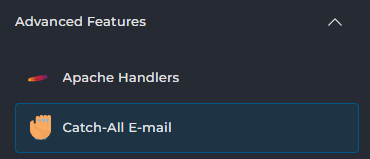
On this page, choose Custom email address and enter the desired email address:

Then click Save. The catch-all will be active immediately.
Important to Know
- A catch-all mailbox receives all emails sent to non-existent email addresses on your domain. This can also result in more spam.
- It's best to use a catch-all only if you deliberately want to collect all incoming email in one place and filter it well.
- Make sure the email address you set as a mail catcher is active and that you check it regularly, so you don't miss any important emails.
- The catch-all address only works for domains for which email is active in your hosting package.
- Please note: incorrectly typed or non-existent addresses will also arrive at the configured address. This means you run a higher risk of unwanted mail.
- Setting up or changing a catch-all is usually active immediately, but it may take a few minutes before all mail servers have processed this everywhere.
Need Help?
Can't figure it out? Then contact our helpdesk. We're happy to help you further.