You can easily view your web statistics in DirectAdmin.
Logging in and opening DirectAdmin
Here's how to open DirectAdmin:
1. Log in to the control panel
Go to: mijn.bhosted.nl
Log in with your username and password.
2. Open DirectAdmin
- Click on DirectAdmin Paneel in the menu
- You will automatically be redirected to DirectAdmin

Go to Site summary & logs
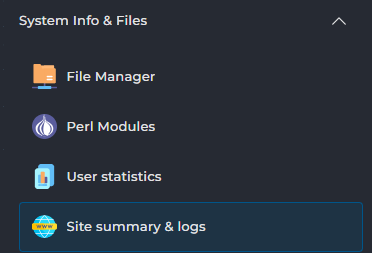
In DirectAdmin, choose Site summary & logs on the left under System info & files:
On the next screen, click the View stats button next to the domain name:

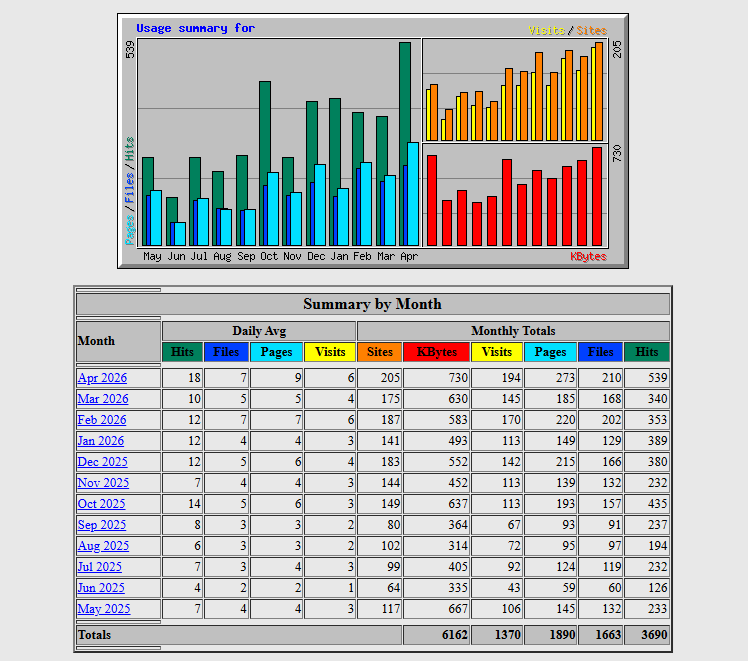
You will now see the statistics for the selected website. Click on one of the displayed months for detailed information per month:
Important to know
- Web statistics such as Webalizer and AWStats give a general overview of your visitors, but may differ from tools like Google Analytics.
- Not all traffic comes from real visitors; bots and crawlers are sometimes counted as well.
- The statistics are usually updated once a day, so they are not real-time.
- You may only see statistics once your website has actually had visitors.
- Do you use multiple domains or subdomains? Make sure you're looking at the correct statistics.
- Want more in-depth analysis, such as conversions and user behavior? Use an external tool for that.
Need help?
Can't figure it out? Please contact our helpdesk. We're happy to help.