There are several ways to log in to your WordPress website. Below we explain the most commonly used methods.
Log in directly via wp-admin
You log in directly to your WordPress website via the admin environment.
- Go to your website's login page by adding
/wp-adminafter your domain name (for example:https://yourdomain.com/wp-admin) - You will now see the WordPress login screen
- Enter your username and password
- Click Log In
You will now be redirected to your website's dashboard.
Logging in via mijn.bhosted.nl (Installatron)
Did you install WordPress via Installatron? Then you can also easily log in via your hosting environment.
-
Go to mijn.bhosted.nl
-
Log in with your username and password
-
Click the DirectAdmin panel button to go to DirectAdmin

-
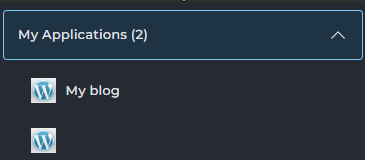
In the left-hand menu, under My Applications, you will see your WordPress installation(s)
-
Click on the WordPress installation you want to log in to
-
On the next page, click Login in the top right corner
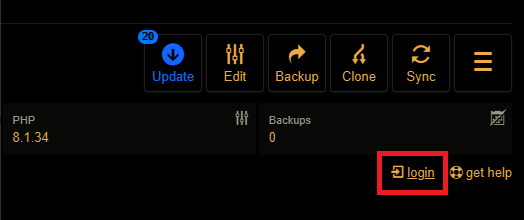
You will now be automatically logged in to the WordPress environment, without having to enter your details again.
Can't log in?
In that case, check the following:
- Are you using the correct username and password?
- Does the URL to
/wp-adminwork correctly? - Have you already tried resetting your password?
You can also change your login details yourself in DirectAdmin. You can read how to do this in this article.
Can't figure it out? Feel free to contact the bHosted helpdesk.