In this article we explain how to easily create a user within a reseller package.
Logging in to bHosted
Go to https://mijn.bhosted.nl and log in with your username and password. Then click through to the DirectAdmin control panel.
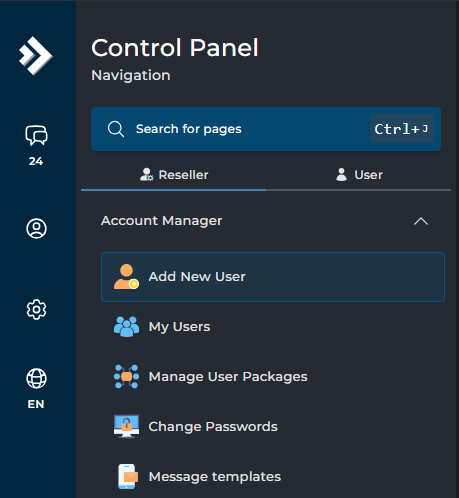
At the bottom left, under the Reseller tab, next to Account Manager, choose Add New User.
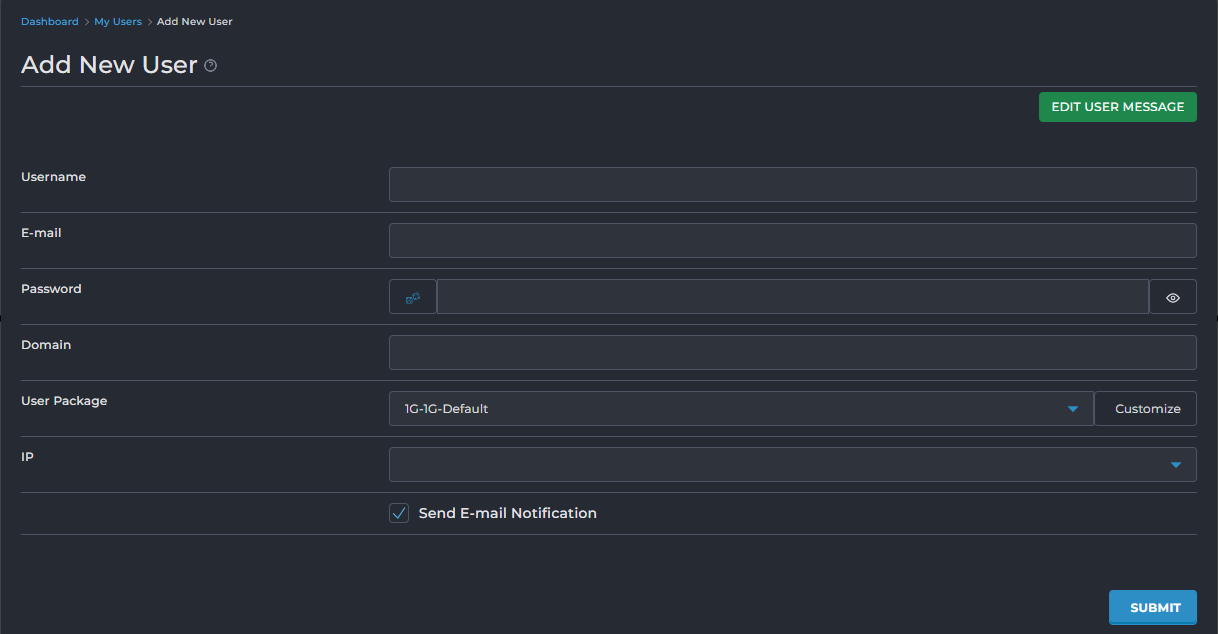
Enter the details of the new user here, such as username, password and domain. Under user package, immediately choose which package you want to link to this user. Click SUBMIT at the bottom and the user has been created.
Important to know
- The username you create is also used as the login name for DirectAdmin.
- The chosen domain is linked directly to the new user.
- Make sure you create a package first, before adding a user.
- Without a package, the limits and settings will not be applied automatically.
- Check in advance whether there is still enough space within your reseller account for extra users and domains.
- After creating the user, it may take a few minutes before all services are fully active.
- Store the password securely right after creating it, or share it directly with the user.
Problems setting this up?
Unable to create a user? Please contact bHosted's helpdesk. We're happy to help.