You log in to the bHosted control panel to manage your services and details. Below you can read the different ways to get there and exactly how logging in works.
Straight to the control panel
You can access the control panel directly via this link: https://mijn.bhosted.nl
On this page you log in right away with your username (login) and password.
Logging in via the website
You can also reach the control panel via the bHosted website:
-
Go to the website: https://www.bhosted.nl
-
Look in the top right corner of the page
-
Click the person icon (account icon)
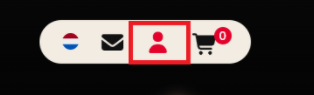
-
You will automatically be redirected to the control panel login page
-
Enter your login and password
-
Click Log in
What do you need to log in?
To log in, you need the following details:
- Username / login
- Password
Lost these details? Use the forgot-password feature or contact our helpdesk.
Tips for logging in
- Check that you enter your details correctly, paying attention to capital letters.
- Bookmark the login page so you can get there faster next time.
- Always log out when you're done, especially on a shared computer.
Having trouble logging in?
Can't log in? First check that you're using the correct details. Still stuck? The bHosted helpdesk is happy to help you further.