With a separate FTP account, you can give someone access to (part of) your website files, without having to share your main account. You can easily set this up via DirectAdmin.
Logging in and opening DirectAdmin
Here's how to open DirectAdmin:
1. Log in to the control panel
Go to: mijn.bhosted.nl
Log in with your username and password.
2. Open DirectAdmin
- Click on DirectAdmin Paneel in the menu
- You will be automatically redirected to DirectAdmin
Go to FTP Management
-
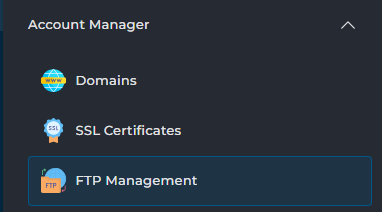
In DirectAdmin, go to FTP Management at the bottom left under Account Manager
Create a new FTP account
-
Click on Create FTP account at the top right

Fill in the details
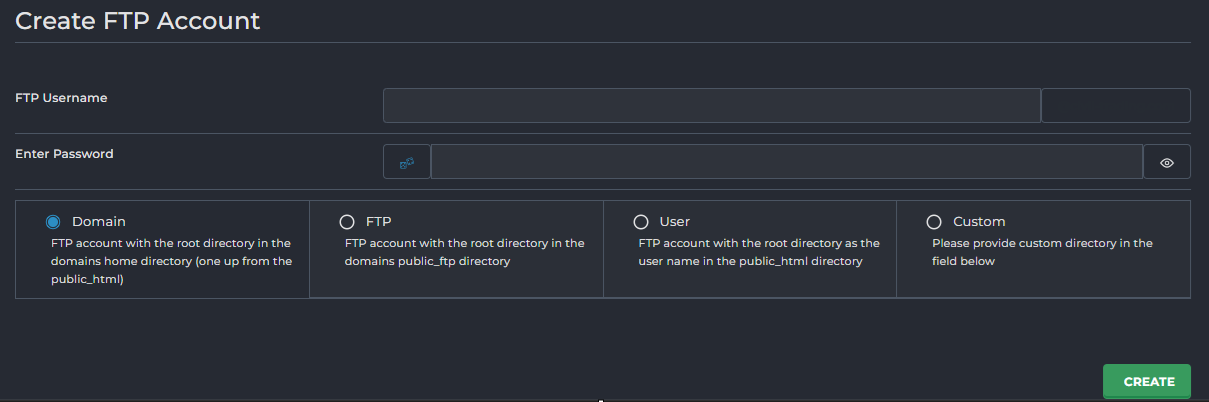
Fill in the following details:
- Username – the username of the FTP account
- Password – a strong password
- Directory / Path – choose which folder the user will have access to
Here you can also choose:
-
A default folder (for example public_html)
-
Or set a custom path via Custom
Create the account
- Click on Create to create the FTP account
- You will then see an overview with all the details, including the password
Important to know
- You can restrict an FTP account to a specific folder. Handy if you only want to give someone access to part of your website.
- Only grant access to the folders that are really necessary, to prevent someone from accidentally modifying other files.
- Always use a strong password to keep unauthorized access out.
- Using the account temporarily (for example for a developer)? Delete it or change the password again once it's no longer needed.
- Most website files are stored in the public_html folder. This is usually the correct folder to grant access to.
- As soon as you've created the FTP account, the changes take effect immediately.
Need help?
Can't figure it out? Please contact our helpdesk. We're happy to help.