With the bHosted control panel, you can easily view and pay outstanding invoices. In this article, we'll show you step by step how it works.
Step 1: Log in to the control panel Go to the control panel via: https://mijn.bhosted.nl
Log in with your username and password.
Step 2: Go to your invoices Are you logged in? Click on your name in the top right to open the menu.
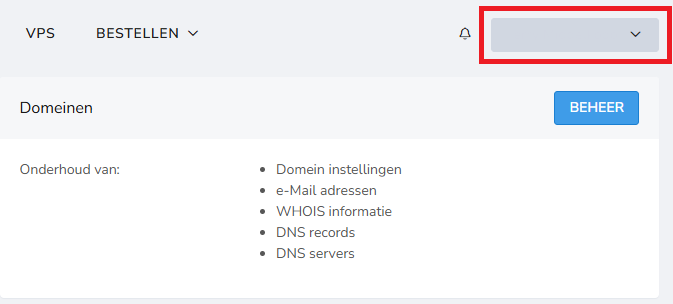
Choose "Invoices" from the dropdown menu. You will now be taken to the page with an overview of all your invoices.
Step 3: View your outstanding invoices
On the invoices page, you will see an overview of all your invoices. If you have outstanding invoices, you will find them here. Click on Pay invoices to continue with the payment process.

Step 4: Start the payment On the payment page, choose Pay the outstanding amount.

This will immediately start the process of settling your invoices.
Step 5: Choose your payment method After starting the payment, you will see various payment options, such as:
- iDEAL
- PayPal
- Bancontact
- Other available payment methods
Choose the payment method you want to use and follow the steps to complete the payment.
Tips
- Regularly check for outstanding invoices to prevent interruptions to your services
- Pay invoices on time to avoid extra costs or blocks
- Keep a confirmation of your payment for your records
Problems or questions? Having trouble paying an invoice, or do you have questions about a payment? Feel free to contact the bHosted helpdesk. We're happy to help.