DNS hosting is one of the services offered by bHosted.nl. DNS records can be configured using the web-based DNS editor. For every domain registered with bHosted.nl that uses the bHosted.nl DNS servers, the DNS records can be modified using the web-based DNS editor. Even if the domain is only parked at bHosted.
These changes are automatically checked and, if approved, immediately implemented in the DNS servers. The change is therefore effective immediately, without intervention from the helpdesk.
Through the bHosted.nl web services, it is also possible to implement DNS settings via HTTP requests. These so-called DNS APIs enable fast and bulk updates without having to log in to the control panel first.
Below are some example screens of the web-based DNS editor from bHosted.nl, which makes DNS configuration very easy. The DNS editor supports the following types of DNS records: SOA, NS, A, AAAA, CNAME, SRV, NAPTR, TXT, MX, TLSA and CAA
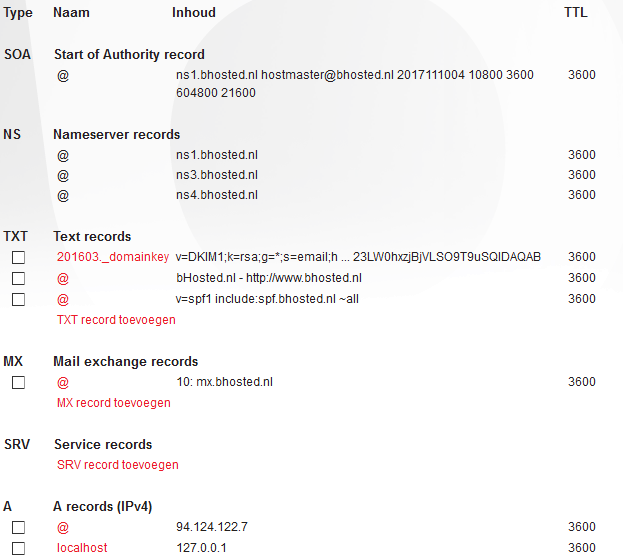
Overview of all DNS records
The web-based DNS editor opens with an overview of all DNS records for the relevant domain. From this screen, records can be modified, deleted and added.
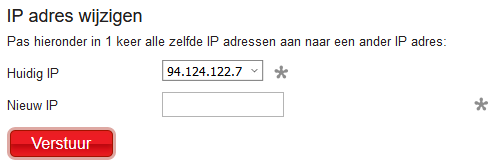
Change all IP addresses at once
It is possible to change all IP addresses to a different IP address at once.
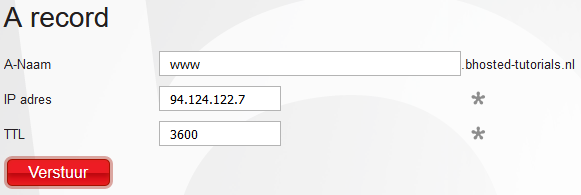
Modifying an A record
The screen on which an A record can be modified. Immediately after confirmation, the change is implemented in the bHosted.nl DNS servers.