Do you want your payments to run automatically? Then simply set up automatic direct debit. Your invoices will then be automatically deducted from your account, so you no longer need to keep track of this yourself.
Step-by-step: setting up automatic direct debit
1. Log in to your account Go to https://mijn.bhosted.nl and log in with your username and password.
2. Open your account settings Click on your name in the top right to open the menu.

3. Go to payment method Click on ‘Payment method’ to open your payment settings.

4. Choose direct debit Select the ‘Direct debit’ option at the top.
5. Enter your details Enter the following details:
- Name of the account holder
- IBAN number
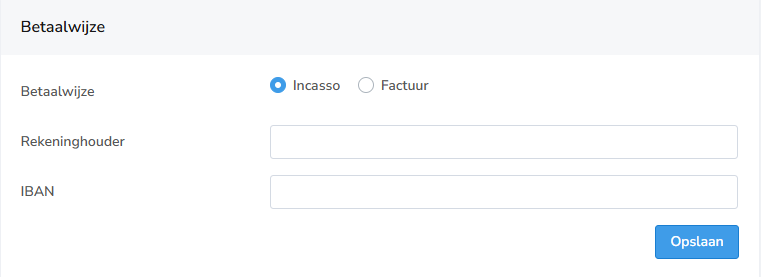
6. Confirm your settings Then click save to activate automatic direct debit.
Important to know
- Your invoices will be automatically deducted from your account
- Make sure there is sufficient balance in your account
- You can change your payment method at any time in the control panel
Questions about automatic direct debit?
Are you having trouble setting up automatic direct debit? Feel free to contact bHosted's helpdesk. We're happy to help.